A spreadsheet for markdown tables, inside Neovim
Markdown pipe tables are great until you have to edit one. Add a word to a cell and every | after it is out of alignment. Insert a column and you're hand-padding five rows of dashes. The format is for reading; editing it by hand is a chore I'd been quietly avoiding for years.
markdown-pipetable.nvim is my answer: it renders the pipe tables in a buffer to fit the window, then lets you move around them cell by cell, scroll sideways, and edit them like a small spreadsheet — while the file on disk stays plain GitHub-flavored markdown the whole time.
The code: — open it to read the README inline.
The trick: the file never changes
The thing that makes this safe to use on real files is that the raw | ... | text stays the source of truth. The rendered, boxed, fit-to-width view is painted on top of it with extmarks — Neovim's virtual-text overlay — so nothing is rewritten until you actually edit a cell. Toggle the plugin off, or :w, and you get normal markdown back. Git sees a one-cell change, not a reflowed table.
| Name | Role | City | Note |
|---|---|---|---|
| Ada | Engineer | London | a deliberately long note to force truncation› |
| 王小明 | 设计师 | 北京 | Chinese 中文 double-width› |
| 김민준 | 디자이너 | 서울 | Korean 한국어 double-width› |
| 山田太郎 | エンジニア | 東京 | Japanese 日本語 double-width› |
| Name | Role | City | Note |
| :--- | :--: | ---: | ---- |
| Ada | Engineer | London | a deliberately long note to force truncation |
| 王小明 | 设计师 | 北京 | Chinese 中文 double-width |
| 김민준 | 디자이너 | 서울 | Korean 한국어 double-width |
| 山田太郎 | エンジニア | 東京 | Japanese 日本語 double-width |
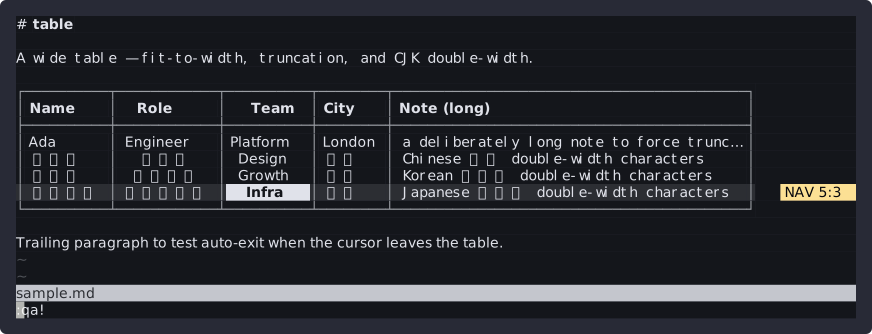
Columns are sized to the window. Anything that doesn't fit is truncated, not wrapped — a … plus a › marker tells you there's more, and you scroll sideways to see it. The alignment row (:---, :--:, ---:) is honored, so left/center/right columns render the way they'll publish.
Modal editing, borrowed from Vim
Once your cursor lands on a table it enters table mode on its own, and leaves when the cursor moves away (:Pipetable toggles it by hand). Inside, it's modal — the same muscle memory as the editor it lives in, scoped to the grid. The table above is live: click it, then h/j/k/l move between cells, <CR> dives in, i edits, <Esc> backs out.
The detail that makes it feel right: in table-navigate you're moving a cell cursor, not a character cursor. The real cursor is hidden, the focused cell is highlighted, and h/j/k/l step between cells. Drop into a cell with <CR> (or jump straight to editing with i/a), and <Esc> steps back out one level at a time — in-cell-edit to in-cell, in-cell to table-navigate. The whole time, watch the source pane: it never stops being markdown.
Fit-to-width is harder than it looks (CJK)
"Size the column to the content" sounds trivial until a cell contains 王小明, 김민준, or 山田太郎 — Chinese, Korean, and Japanese all bring double-width glyphs. 山田太郎 is four characters but eight columns on screen, and a naive #string byte count gets every one of them wrong, so the box edges drift.
Every width calculation goes through strdisplaywidth, and truncation is width-aware down to the straddle case: if cutting at the target would land in the middle of a double-width glyph, it pads a single space so the column edge still lines up. It's the unglamorous code that decides whether the table looks like a table.
Parsing, and the escaped-pipe problem
Detection prefers Treesitter's pipe_table nodes when the markdown parser is installed, and falls back to a regex scanner when it isn't — and both paths derive cell positions by scanning each line, so they produce an identical, byte-accurate model. That scan is also where \| is handled: an escaped pipe is part of the cell text, not a column boundary, so the scanner skips the escaped character instead of splitting on it.
That's the whole dependency story: nothing but Neovim 0.10+. :checkhealth pipetable tells you whether Treesitter or the regex path is active.
Beyond moving around
Navigation is the half you feel most, but the editing operations are the reason it replaces hand-editing. Direct keys cover rows — o/O insert, dd delete, yy/p yank and paste. A <leader>t group covers the structural work: insert/delete/move/duplicate columns, set per-column alignment, and sort by the focused column. Visual mode selects cell-blocks, rows, or columns (v / V / <C-v>), and a yank drops to the system clipboard as TSV — so a column lifts straight into a spreadsheet and back. Every operation rewrites the table in a single edit, which means one u undoes it cleanly.
It's configurable down to each binding and highlight group, but the defaults are meant to need no setup:
{
  'dominic-righthere/markdown-pipetable.nvim',
  ft = 'markdown',
  config = function()
    require('pipetable').setup({})
  end,
}
A note on the demo
The clip up top is a real Neovim session, recorded with reterm as an animated SVG. That it captures cleanly at all — full color, the alternate screen, the plugin's borders painted as virtual text at the edge of the grid — is its own build-journal entry. The two projects ran into each other at exactly the right time: I needed to demo a TUI, and I'd just taught my recorder to see one.
The file stays markdown. The editing stops being a chore. That was the whole brief.