Teaching reterm to record Neovim
reterm records a terminal session into two things at once: a GIF for humans and a structured JSON log for tools. It's what powers the terminal demos on this blog. It was happy recording a shell — type a command, capture the output, render the frames.
Then I pointed it at Neovim, and it fell apart in three different ways before it even drew a frame.
The code: — open it to read the README inline.
A shell session is easy mode for a recorder: output scrolls down the main screen, colors are mostly the 16 ANSI ones, the cursor stays on a line. A TUI is the opposite — it takes over the alternate screen, paints in 24-bit color, and redraws the whole grid on every keystroke. Each of those is a different assumption my capture code had quietly baked in.
Bug one: every color came out grey
The first recording of Neovim rendered, but in monochrome. Syntax highlighting, the statusline, the plugin's borders — all default-colored.
The terminal emulator I capture through (pyte) resolves both 256-color and 24-bit truecolor down to a bare rrggbb hex string — no leading #. My color resolver only recognized #-prefixed hex, so every truecolor cell fell straight through to the numeric-ANSI branch, where int("008000") is a nonsense index and you get the default color back.
# Theme.resolve_color  (reterm/render/themes.py)
if color.startswith("#"):
  return color

# pyte hands us "008000" for 24-bit / 256-color — no '#'.
# Nothing catches it, so we fall through to…
index = int(color)                  # "008000" -> 32768, meaningless
return self.get_ansi_color(index)   # -> default color in the GIF
The ordering matters more than it looks: 008000 is both a valid hex green and a valid integer. Put the hex check after the int() and you'll happily interpret green as color index 8000. The React player already handled bare hex, which is exactly why the same recording looked fine in the browser but grey in the GIF — a tell I should have read sooner.
Bug two: it crashed the moment the statusline drew
Color was cosmetic. The next one was fatal: with laststatus=2 (a statusline that's always on — i.e., basically every real Neovim), the recording crashed mid-run with a KeyError out of pyte.
The alternate-screen buffer I'd built was a plain dict. pyte's main buffer is a defaultdict of default-char cells, so a draw into an un-touched row just works. My alt-screen buffer wasn't — so the first erase or draw onto a row nothing had written to yet (a right-aligned statusline, say) looked up a missing key and threw. The fix is to mirror pyte exactly: back the alt screen with a defaultdict over pyte's own StaticDefaultDict.
That crash was also eating late-frame content — right-aligned virtual text, the kind of thing a markdown-table plugin paints at the edge of the screen — because the recording died before those rows were ever captured.
Bug three: the columns wobbled
With color and stability fixed, box-drawing TUIs had a subtler problem: vertical rules didn't line up frame to frame. SVG positions text by advance width, and a font's idea of how wide │ or a CJK glyph is doesn't always match the terminal's fixed grid. So columns drifted by a pixel here and there — fine for prose, very visible for a table.
The fix pins each glyph to its grid column with a per-character x list — but only for runs that actually contain non-ASCII glyphs. Plain ASCII keeps a single x, so a normal shell recording doesn't balloon ~2.5× in size for a problem it never had.
All three, or none
Each fix is small on its own, but they only pay off together — leave any one out and the recording is still unusable. Here's the same Neovim frame with each fix on a switch. Flip one off and its symptom comes straight back; all three on is the capture I was actually after:
| Name | Role | City |
| Ada | Engineer | London |
| 山田太郎 | エンジニア | 東京 |
| Bob | PM | NYC |
A clean capture — full colour, stable, aligned. All three fixes are what got it here.
The proof: reterm recording Neovim
Here's a fresh capture — Neovim, full color, alt-screen, with markdown-pipetable.nvim painting a fit-to-width table over the buffer. This is the exact case that used to crash:
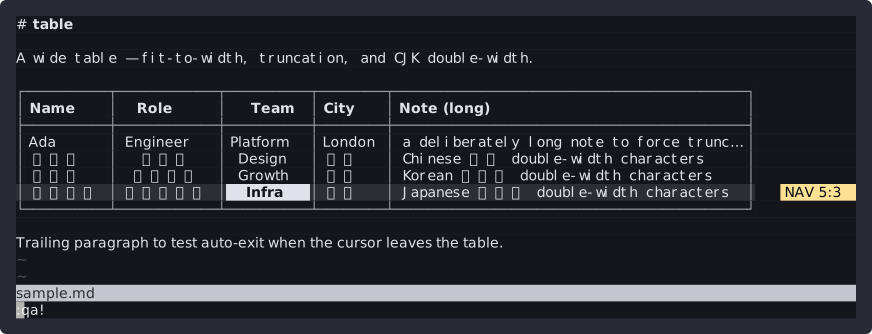
That's also the post I wrote next — the plugin doing the painting is its own story. The recorder being able to capture it at all is this one.
Animated SVG you can <img>
The reason that frame above is an SVG and not a GIF is the other half of this update. reterm run -o demo.svg now emits a self-contained CSS flipbook: it animates inline on GitHub through a plain <img>, the text stays selectable, and viewers that don't animate get the final frame as a static poster. reterm embed prints the Markdown for it. No JS, no GIF dithering — and it's how the hero at the top of this post is also available:
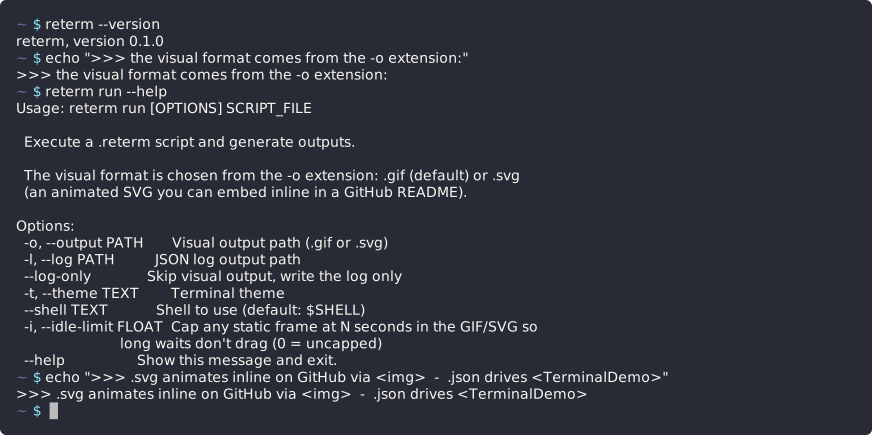
There's a --idle-limit too (default 2s): it caps how long any single static frame is held, so a long sleep: or a thinking pause doesn't bake dead air into the loop.
One more thing: the player stopped flashing
While I was in here, I fixed a playback bug in the React player I'd been pretending not to see. On every command it would flash the command's first word, then snap to the full output. It was the timeline builder keeping an intermediate snapshot taken after the shell had echoed the command but before any output landed. Dropping those pre-output echo frames (player 0.1.1) is the difference between a typed command that resolves smoothly and one that stutters — most visible on the demos right here on this blog, all of which got quietly better the moment I re-vendored it.
Three assumptions, three fixes, one capability: reterm records full-screen TUIs now. The thing that finally convinced me it was real wasn't a test — it was watching it record the messiest TUI I had on hand without dying.